# \[App\] Eurotronic Technology App (Stable: v3.0.1)
**URL:** https://community.homey.app/t/app-eurotronic-technology-app-stable-v3-0-1/5771
**Category:** Apps
**Tags:** app, z-wave, official, homey-bridge
**Created:** [December 22, 2018, 1:25pm UTC](https://community.homey.app/t/app-eurotronic-technology-app-stable-v3-0-1/5771 "2018-12-22T13:25:33Z")
**Posts on this page:** 20
**Page:** 10
### Author:  [@Caseda](https://community.homey.app/u/Caseda)
#### Post date: [December 20, 2019, 7:52am UTC](https://community.homey.app/t/app-eurotronic-technology-app-stable-v3-0-1/5771/182 "2019-12-20T07:52:09Z")
That’s not an z-wave app though and not sure the device the questioner is taking about is zwave too?
If they made zwave asynchronous, then every device will break after +/- 10 minutes, so most likely not
---
### Author:  [@RonnyW](https://community.homey.app/u/RonnyW)
#### Post date: [December 20, 2019, 8:08am UTC](https://community.homey.app/t/app-eurotronic-technology-app-stable-v3-0-1/5771/183 "2019-12-20T08:08:05Z")
Thanks. I’m just searching for a reason for the current behavior and try to exclude possible options 😇
---
### Author:  [@RonnyW](https://community.homey.app/u/RonnyW)
#### Post date: [December 22, 2019, 8:34am UTC](https://community.homey.app/t/app-eurotronic-technology-app-stable-v3-0-1/5771/184 "2019-12-22T08:34:01Z")
Hello @Caseda,
I had the same sitatuion again. The thermostat was not changed, but the Homey app reports the new target temperature. So in the app I can see 22°C, but the thermostat has still 18°C.
Could it be possible, that Athom changed something and error responses are not sent back to your app if a value could not be set?
In the past, the old target temperature was visible in the app device if it was not possible to set it in the thermostat. So I could react on if the wrong temperature was shown in the app (or dashboard).
Do you have a chance to check this behavior (if the error handling was changed by Athom)?
Thank you in advance.
---
### Author:  [@anon8748058](https://community.homey.app/u/anon8748058)
#### Post date: [December 22, 2019, 9:10am UTC](https://community.homey.app/t/app-eurotronic-technology-app-stable-v3-0-1/5771/185 "2019-12-22T09:10:23Z")
I see this behaviour too with other devices sometimes. The Homey app is not in sync with the real situation. Can you confirm that the values are properly displayed on: [http://developer.athom.com/tools/device](http://developer.athom.com/tools/device) ?
If that is the case its an issue in the app. If not, it’s an issue in the Homey sphere or the app.
---
### Author:  [@RonnyW](https://community.homey.app/u/RonnyW)
#### Post date: [December 22, 2019, 9:53am UTC](https://community.homey.app/t/app-eurotronic-technology-app-stable-v3-0-1/5771/186 "2019-12-22T09:53:17Z")
No, the DEV-page has the wrong target temperature, too.
It’s displayed in Homey app and HomeyDash.
The device capability target\_temperature has 22°C and the thermostat itself has 18°C.
@Caseda:
Does your app set back the target temperature to the previous value in error case?
Or does it just set the device capability and Homey has to handle the error itself (and set back the previous value)? Then it’s an error which should be reported to Athom?
---
### Author:  [@Caseda](https://community.homey.app/u/Caseda)
#### Post date: [December 22, 2019, 11:18am UTC](https://community.homey.app/t/app-eurotronic-technology-app-stable-v3-0-1/5771/187 "2019-12-22T11:18:20Z")
It is a little bit of a combination.
the app sets the value in Homey,
Homey sends this value to the device and waits for the acknowledge back of the device if it received it.
If yes then, and only then the app will say against homey that it was OK to use the new value.
If this acknowledge doesn’t get received the app will tell Homey that it failed, and Homey then did put back the old value.
But **a lot** has changed, even without our (the developers) knowledge, so currently i have no clue if anything was changed in such a way to change/break this behaviour and if it needs to be fixed on app level or something broke on Homey level.
Unfortunately, I don’t know if i have any time in my christmas holiday to debug this.
---
### Author:  [@RonnyW](https://community.homey.app/u/RonnyW)
#### Post date: [December 22, 2019, 11:25am UTC](https://community.homey.app/t/app-eurotronic-technology-app-stable-v3-0-1/5771/188 "2019-12-22T11:25:37Z")
Hi, I didn’t want you to break your holiday 😊
Just wanted to report/comment this behaviour. So if you have an idea and I can help you to test something, then please write.
Until then have a nice holiday 🎄 and happy new year 🥂 🎆
---
### Author:  [@Mark1](https://community.homey.app/u/Mark1)
#### Post date: [January 6, 2020, 9:07pm UTC](https://community.homey.app/t/app-eurotronic-technology-app-stable-v3-0-1/5771/189 "2020-01-06T21:07:01Z")
I tried to add a new StellaZ to Homey, but the pairing doesn’t work. Step 1 is succesful, but the interview phase does not seem to start. The ZWave logging:
| 2020-01-06T20:22:06.829Z | Command[589] start: addNode |
| --- | --- |
| 2020-01-06T20:22:06.848Z | Command[589] status: addNode, status: ADD\_NODE\_STATUS\_LEARN\_READY |
| 2020-01-06T20:24:33.655Z | Command[590] start: addNodeAbort |
| 2020-01-06T20:24:33.658Z | Command[590] end: addNodeAbort |
| 2020-01-06T20:24:33.767Z | Command[589] status: addNode, status: ADD\_NODE\_STATUS\_DONE |
| 2020-01-06T20:24:33.768Z | ProcessAddNode[572]: Error: aborted |
| 2020-01-06T20:24:33.771Z | Command[589] end: addNode |
Does anyone have any suggestions? Thanks in advance!
---
### Author:  [@Osorkon](https://community.homey.app/u/Osorkon)
#### Post date: [January 13, 2020, 12:25pm UTC](https://community.homey.app/t/app-eurotronic-technology-app-stable-v3-0-1/5771/190 "2020-01-13T12:25:40Z")
@Caseda if I want to send the room temperature to a Spirit via flow, what do I have to enter here?
I know I can do it also out of the box.
But I’m interested on the raw Parameters.
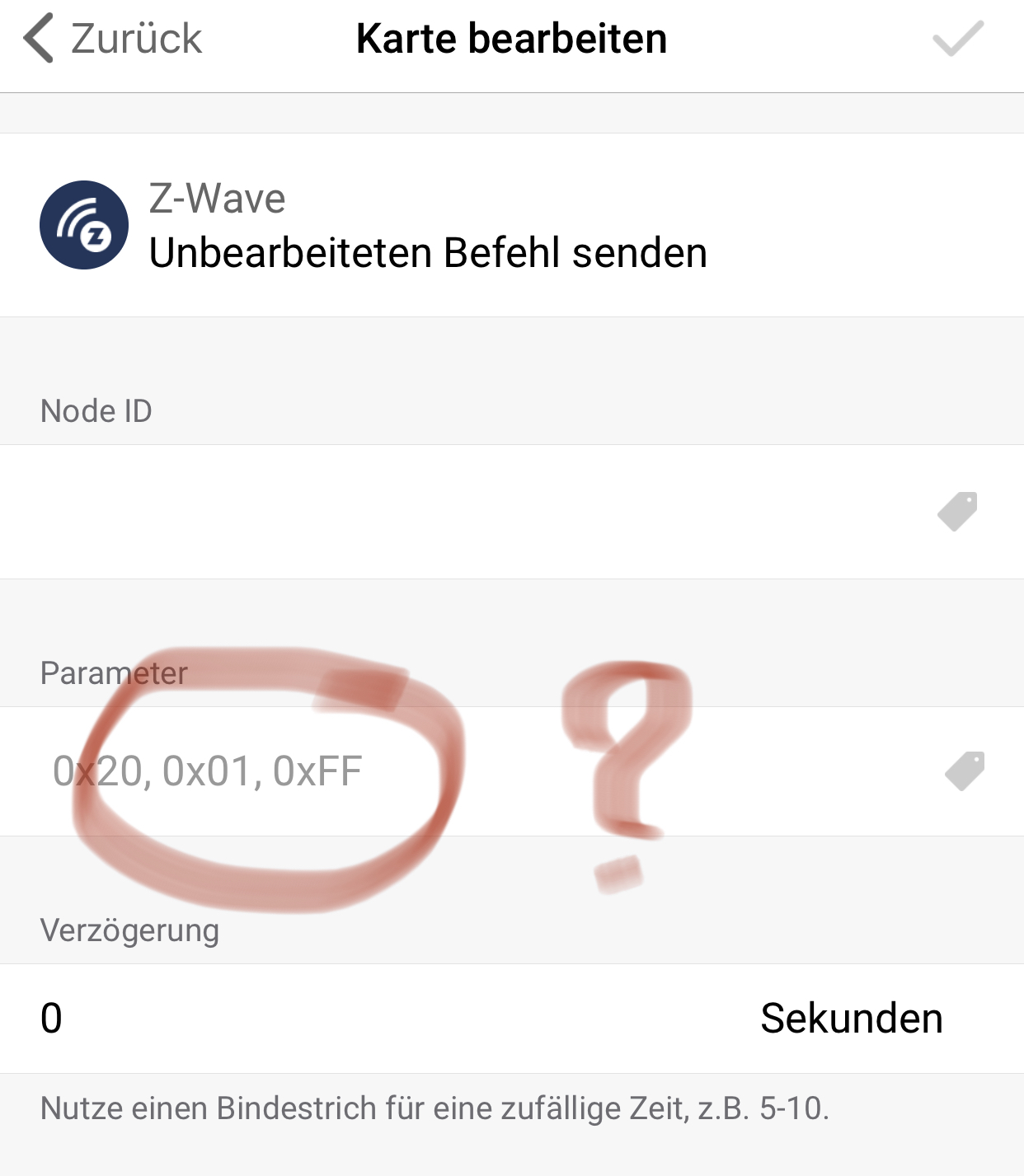
Thanks a lot.
---
### Author:  [@Caseda](https://community.homey.app/u/Caseda)
#### Post date: [January 13, 2020, 4:04pm UTC](https://community.homey.app/t/app-eurotronic-technology-app-stable-v3-0-1/5771/191 "2020-01-13T16:04:10Z")
If your valve is included secure, then that card won’t do anything, even with the right command.
---
### Author:  [@Osorkon](https://community.homey.app/u/Osorkon)
#### Post date: [January 13, 2020, 4:06pm UTC](https://community.homey.app/t/app-eurotronic-technology-app-stable-v3-0-1/5771/192 "2020-01-13T16:06:44Z")
And if it’s include Unsecure?
And how did you managed it within the App?
---
### Author:  [@Caseda](https://community.homey.app/u/Caseda)
#### Post date: [January 13, 2020, 4:17pm UTC](https://community.homey.app/t/app-eurotronic-technology-app-stable-v3-0-1/5771/193 "2020-01-13T16:17:43Z")
If it is included unsecure then it is possible, but ill have to search the hex numbers, as I’m not at home this week, I can’t search for you yet.
The app knows your device is included secure, that (generic) card doesn’t
---
### Author:  [@Johan73](https://community.homey.app/u/Johan73)
#### Post date: [February 10, 2020, 4:05pm UTC](https://community.homey.app/t/app-eurotronic-technology-app-stable-v3-0-1/5771/194 "2020-02-10T16:05:30Z")
Hi guys,
I got my Homey for 4 weeks and I am amused to see how I can easily feed my Spirits with the room temperature from external sensors via flows!
Unfortunatly, I didn’t managed to do that with a direct association. I have tried with folowing temperature sensors:
- Philio PST02-1C 3 in 1
- Heiman temperature sensor
I couldn’t include them in secure mode, is that the reason?
Which sensor is working with the Spirit for a direct association?
Many thanks for your help!
---
### Author:  [@Caseda](https://community.homey.app/u/Caseda)
#### Post date: [February 13, 2020, 7:53pm UTC](https://community.homey.app/t/app-eurotronic-technology-app-stable-v3-0-1/5771/195 "2020-02-13T19:53:44Z")
yes, only secure devices can send (external) temperature values with direct assoctiations, for this reason i implemented a flow card that can also send this temperature to the valve, so any temperature sensor can then be used.
---
### Author:  [@Johan73](https://community.homey.app/u/Johan73)
#### Post date: [February 17, 2020, 11:44am UTC](https://community.homey.app/t/app-eurotronic-technology-app-stable-v3-0-1/5771/196 "2020-02-17T11:44:52Z")
Thanks @Caseda for you answer!
Can you please tell me with which sensors you successfuly associate the Spirit with?
The other way around, is it possible on Homey to include the Spirit non-secure and then create the association with a non-secure included sensor? If yes, how does this go?
Many thanks for your help.
---
### Author:  [@Caseda](https://community.homey.app/u/Caseda)
#### Post date: [February 17, 2020, 1:16pm UTC](https://community.homey.app/t/app-eurotronic-technology-app-stable-v3-0-1/5771/197 "2020-02-17T13:16:26Z")
I’ve never tested direct association with my spirit, as I don’t have any control over that part there isn’t much use to test it (and don’t use that way either), only from flows to make sure that works as that is my implementation.
It is possible to include the thermostatic unsecure, but you’ll have to edit (add) part of the code and then re-include the thermostatic.
---
### Author:  [@Osorkon](https://community.homey.app/u/Osorkon)
#### Post date: [February 17, 2020, 2:12pm UTC](https://community.homey.app/t/app-eurotronic-technology-app-stable-v3-0-1/5771/198 "2020-02-17T14:12:14Z")
To send the current temperature to the Spirit using associations the temperature sensor must support the Associations Group “Sensor Multilevel Reports”.
Like the Secure SRT321 does it. See manual Secure SRT321 Association Group 5.
E.g. Fibaro MS or Aeotec MS you can not use, because those doesn’t support the needed associations group!
---
### Author:  [@Johan73](https://community.homey.app/u/Johan73)
#### Post date: [February 18, 2020, 8:19am UTC](https://community.homey.app/t/app-eurotronic-technology-app-stable-v3-0-1/5771/199 "2020-02-18T08:19:23Z")
Hallo @Osorkon,
I had a look on the SRT321 and I am wondering how you include the thermostat. According my researchs, the SRT321 is not supporting secured inclusion. I have checked for both Z-Wave and Z-Wave + versions (has you mention the group 5 for “sensor multilevel reports”, it seems you are using the Z-Wave version).
@Caseda, can you tell me a bit more concerning unsecured inclusion? Is there somewhere a tutorial?
Many thanks guys for your help! 😉
---
### Author:  [@Osorkon](https://community.homey.app/u/Osorkon)
#### Post date: [February 18, 2020, 8:50am UTC](https://community.homey.app/t/app-eurotronic-technology-app-stable-v3-0-1/5771/200 "2020-02-18T08:50:45Z")
I don’t own a STR321. But you are right the STR321 doesn’t support secure Inclusion.
So Associations between Spirit and STR321 only works if you are able to include the Spirit Unsecure.
Why it’s not possible with Homey to choose between secure and Unsecure Inclusion like a lot of other Z-Wave Gateways offer, I can’t understand it!
---
### Author:  [@Brice](https://community.homey.app/u/Brice)
#### Post date: [February 18, 2020, 9:15am UTC](https://community.homey.app/t/app-eurotronic-technology-app-stable-v3-0-1/5771/201 "2020-02-18T09:15:19Z")
Hi! Finally, it seems that I’m not the only one to struggle with my Eurotronics … temperature is completely crazy, sometimes it’s freezing (15° in the kids bedroom while I ask for 18.5) and sometimes I wake up in the middle of the night and it’s 22 in the kitchen…
I have bought around 15 devices for 2 floors and since the beginning nothing is working. I’m quite new to Homey so I thought it was my flows which were completely wrong but apparently no.
Do you have any news on your side ? I’ve seen the Jeedom forum about the Aeotec / Eurotronic issue. If someone needs a translation, I’m french if it can help.
If I can’t find any solution, I think I will sell everything and move to netatmo!
[Previous page](https://community.homey.app/t/app-eurotronic-technology-app-stable-v3-0-1/5771.md?page=9)
[Next page](https://community.homey.app/t/app-eurotronic-technology-app-stable-v3-0-1/5771.md?page=11)