I can see the device in the registered devices
also removed the switchbot app, restarted homey, restarted the esp.
When adding a device to homey the switchbot app keeps “searching”
I can see the device in the registered devices
also removed the switchbot app, restarted homey, restarted the esp.
When adding a device to homey the switchbot app keeps “searching”
Ok, so if the ESP32 has found the devices, the issue is with network connection between the ESP32 and Homey.
If you open the app settings page and enable the Diagnostics Log, then restart the app. Look back at the log while the app starts up and check if the app finds and connects to the ESP32. Send the log if you would like me to take a look.
Hi Adrian, so this is the diagnostic report code i got : 30459c5b-fc2e-455f-a59e-6b040bdad31c when opening the config page of the switchbot app it keeps loading (webinterface) on my mobile app i can see :
detected - invalid token
log - no Oauth2 client
get status : no oauth2 client found
also shared the diagnostic log with you
I don’t think it’s visible. the mac adress of the esp starts with 80-F3
on the device page of the esp the hubmac starts with c4:10 and adress starts with c1:32
Yeah. I get the same, so I have reported it to Athom.
resolved it with a logic and “get” card ; so it works now (but without the app)
I have a Hub2 that triggers a scene for my AC and some homey flows that send a trigger command to the hub. The scene triggering from homey to the hub don’t work anymore. Triggering direct from the switchbot app on my phone works, the homey works for other flows so I suspect the connection between the homey and hub are at fault. I can see the hub in the the swichbot homey app so not sure how to troubleshoot. Homey is on 12.9.0-rc.5, homey switchbot app is on 2.0.35, and the hub is on fw2.6-3.8. all devices rebooted, no effect. Any troubleshoot suggestions? ty
Could you open the app settings, select the Log tab and set the level to Detailed information. Then run the Flow to trigger the scene. Then go back to the log and tap on Send Log.
DM sent
Hello all,
I am quite new to the Homey world and hopefully you can help me. For my setup I got a bunch of switchbot plugs, which I managed to connect via homey (plug eu hub). The plugs measure the amount of electricity and I have had the Issue at first that every day or two I got an invalid token error, which I could only solve by repairing the device and relogging on to my switchbot Account. By getting a hub mini, entering it afterwards to my switch bot app and account, deleting the switch bot app from homey and reinstalling it finding all Devices again and rebuilding all flows I was able to extend it to one week before the token error appears. Still repairing the device works, but as there are 16 plugs and many flows repairing all 16 every week or reinstalling the homey app and rebuilding all the flows takes quite a bit of time and is rather annoying. I also found the token in the switchbot development settings in the app, but there is nowhere to reenter it in the app settings in homey, logs or anything else. Restarting the app in homey did not help either. Is there a proper solution to this? Is it an issue I will be facing with every other Brand as well (e.g. aqara) as the measuring of the electricity in intervals drains the token to fast with 16 devices? Sorry if there was already an issue recorded but in the past 400-500 messages before I could not find anything related. I hope you can help me and thank you very much in advance:)
Could you send the Log from the app settings page as soon as you see the error:
I have seen others report the token is lost, but I can’t get to the bottom of it as I don’t see the issue myself.
Hello Adrian,
Thanks for the quick reply. This is the error message that pops up in the log.
* 2025-11-04T14:58:30.061Z
!!! Plug getHubDeviceValues: Invalid Token.
* 2025-11-04T14:58:30.069Z
!!! Plug getHubDeviceValues: Invalid Token.
* 2025-11-04T14:58:30.070Z
!!! Plug getHubDeviceValues: Invalid Token.
* 2025-11-04T14:58:30.076Z
!!! Plug getHubDeviceValues: Invalid Token.
* 2025-11-04T14:58:30.086Z
!!! Plug getHubDeviceValues: Invalid Token.
* 2025-11-04T14:58:30.087Z
!!! Plug getHubDeviceValues: Invalid Token.
* 2025-11-04T14:58:30.089Z
!!! Plug getHubDeviceValues: Invalid Token.
* 2025-11-04T14:58:30.090Z
!!! Plug getHubDeviceValues: Invalid Token.
Most probably not with directly paired devices, or with hubs communicating directly with Homey.
Any ETA of the (beta?) support of the new (upcoming) “Switchbot Presence Sensor” please.
Thanks  .
.
Just ordered 2 pieces of them.
This sensors in combination of the new “Boolean is on/off for … (certain time period/duration)” finally can shutdown properly many smart plugs(with power measuring) and lights in my living & sleeping room to kill my massive standby power leak.
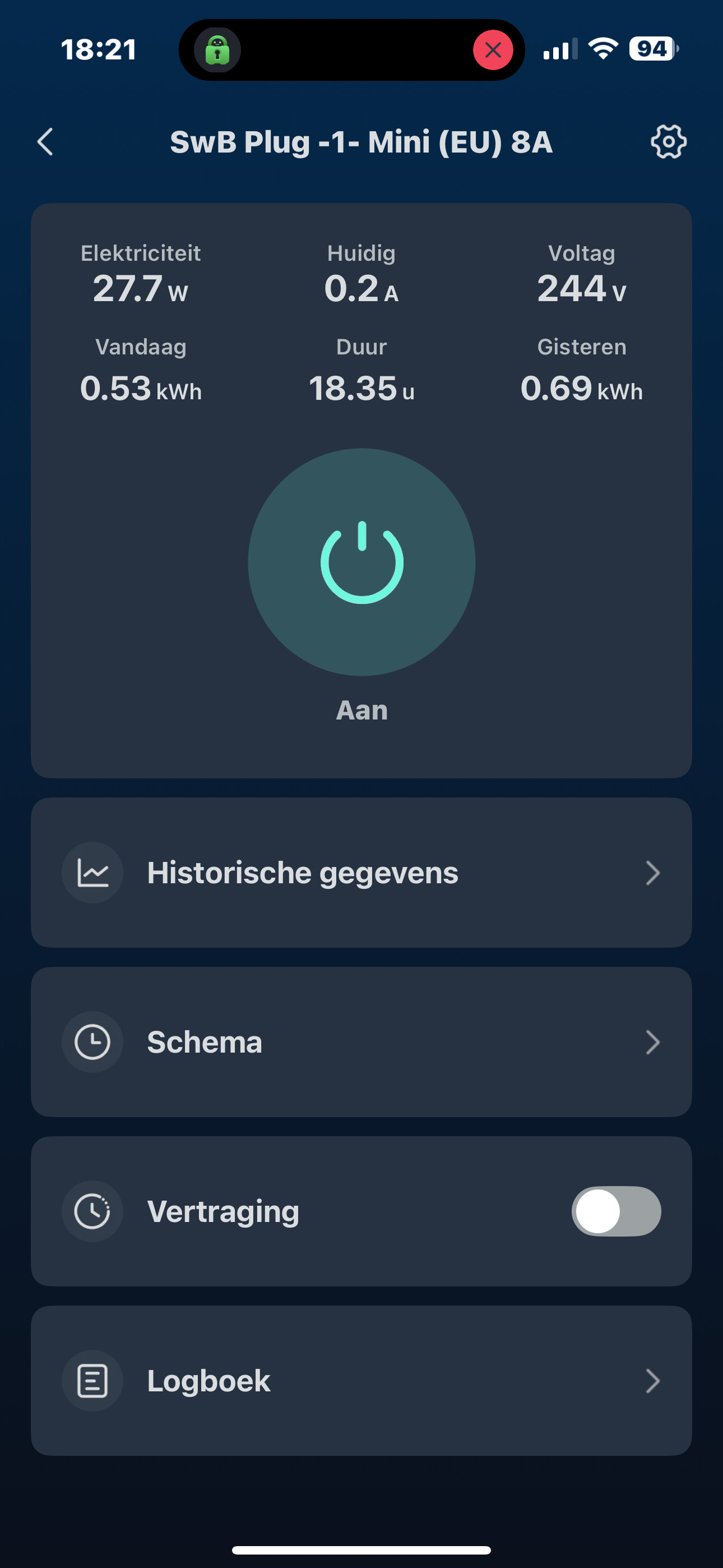
The value of the power measuring of my switchbot EU power plug mini (with latest firmware 0.6) is wrong.
The current value is faulty. (Maybe *1000 ??!)
Switchbot Homey app 2.0.41
218 A instead of 0,22A !!
The other values are also not quite the same like in the switchbot app. 
Is the plug (eu) mini only available to connect/contact through the cloud  ?? No Bluetooth possible/allowed please ?
It seems that Bluetooth functionality for the plug mini (eu) is possible/available for Home Assistant:
Great app, will the RGBWW Floor Lamp be supported as well? Couldn’t find it in the tread.
Fixed in the next update (v2.0.42).
Added to the next update (v2.0.42).
Thank You very much. And how about the bluetooth/BLE support for the Plug mini (EU) ?
Just asking if ever it will be available/supported or its not going to be supported in the near future (= next 6-8 months) . This makes my decision more simple if I should buy more plugs the upcoming Black Friday.
Thanks.
(I always buy 1 piece for testing before i’m going all in / for more.)
I haven’t looked into the BLE for the socket. SwitchBot haven’t published much for BLE lately, so I have to try and decode things by trial and error. Therefore no guarantees that it will come anytime soon.
Ok.
Thank You.
It’s just that the BLE support of the plug and the (BLE support) of the upcoming Presence Sensor is crucial for my purpose of shutting everything (on Standby) down is its not used (=low power consumption measuring) and really nobody is in the living room or sleeping room (= determined by the new Switchbot presence sensor).
And to be sure I always add my switchbot devices twice (= As BLE and! Hub/Cloud version) and use them both as a condition in a flow. To switch off the BLE(if supported in the future:person_shrugging:t2:) and hub/cloud version of every plug 
With the current PIR (switchbot) motion sensor it’s not so accurate possible.
Until then I have to do this by a 85% reliable “solution” with shelly plugs and Bluetooth PIR motion sensors. 
Which turned off the power of my TV through a shelly plug while watching & missing! the last 5 minutes of a movie and clearly sitting to still on my couch  . (Happened yesterday.
  )
)