# \[APP\]\[Cloud & Pro\] Somfy Tahoma & Connexoon (v4.0.124, test v4.0.152)
**URL:** https://community.homey.app/t/app-cloud-pro-somfy-tahoma-connexoon-v4-0-124-test-v4-0-152/35206
**Category:** Apps
**Tags:** official, homey-pro
**Created:** [September 29, 2020, 3:01pm UTC](https://community.homey.app/t/app-cloud-pro-somfy-tahoma-connexoon-v4-0-124-test-v4-0-152/35206 "2020-09-29T15:01:37Z")
**Posts on this page:** 20
**Page:** 89
### Author:  [@Adrian\_Rockall](https://community.homey.app/u/Adrian_Rockall)
#### Post date: [September 25, 2023, 8:41pm UTC](https://community.homey.app/t/app-cloud-pro-somfy-tahoma-connexoon-v4-0-124-test-v4-0-152/35206/1775 "2023-09-25T20:41:49Z")
How are you closing the shutters?
If you have a cloud only connection, then events are polled every 30 seconds (3 seconds for local connections). So, the shutters could be closed before the app knows anything has happened.
---
### Author:  [@Adrian\_Rockall](https://community.homey.app/u/Adrian_Rockall)
#### Post date: [September 26, 2023, 9:29pm UTC](https://community.homey.app/t/app-cloud-pro-somfy-tahoma-connexoon-v4-0-124-test-v4-0-152/35206/1776 "2023-09-26T21:29:41Z")
Just a heads up, I will be on holiday for two weeks, so probably won’t be responding to support request.
---
### Author:  [@thobu](https://community.homey.app/u/thobu)
#### Post date: [September 27, 2023, 8:39am UTC](https://community.homey.app/t/app-cloud-pro-somfy-tahoma-connexoon-v4-0-124-test-v4-0-152/35206/1777 "2023-09-27T08:39:50Z")
Have a nice holiday, just a heads up, for me this setting doesn’t change anything

My goal would be to get 0 for totally open (up), and 1 for totally closed (down). Currnenlty it’s vice versa
---
### Author:  [@Hugo](https://community.homey.app/u/Hugo)
#### Post date: [September 27, 2023, 11:00am UTC](https://community.homey.app/t/app-cloud-pro-somfy-tahoma-connexoon-v4-0-124-test-v4-0-152/35206/1778 "2023-09-27T11:00:17Z")
Have a nice holiday!
---
### Author:  [@Marius\_Stensrod](https://community.homey.app/u/Marius_Stensrod)
#### Post date: [September 29, 2023, 5:07am UTC](https://community.homey.app/t/app-cloud-pro-somfy-tahoma-connexoon-v4-0-124-test-v4-0-152/35206/1779 "2023-09-29T05:07:16Z")
It sounds like you have to invert the “Position” not the “command”, you may switch both.
---
### Author:  [@thobu](https://community.homey.app/u/thobu)
#### Post date: [September 29, 2023, 8:14am UTC](https://community.homey.app/t/app-cloud-pro-somfy-tahoma-connexoon-v4-0-124-test-v4-0-152/35206/1780 "2023-09-29T08:14:32Z")
I think I tried this in the past already – to no avail. Need to wait till the guest leaves before playing with the blinds.
---
### Author:  [@Encrypt1957](https://community.homey.app/u/Encrypt1957)
#### Post date: [October 1, 2023, 9:49pm UTC](https://community.homey.app/t/app-cloud-pro-somfy-tahoma-connexoon-v4-0-124-test-v4-0-152/35206/1781 "2023-10-01T21:49:28Z")
Hi,
Every few days my blinds stop working, and I get the message “Failed to send command, no valid connections”. the only fix I know is to go into the app settings and click the button to log in again. It sees I’m getting logged out, but since the app has my login information it seems dumb to me that I need to manually log in again.
I cannot find anything about this error, does anyone know what is causing this?
---
### Author:  [@thobu](https://community.homey.app/u/thobu)
#### Post date: [October 2, 2023, 12:08pm UTC](https://community.homey.app/t/app-cloud-pro-somfy-tahoma-connexoon-v4-0-124-test-v4-0-152/35206/1782 "2023-10-02T12:08:00Z")
Doesn’t work for me. It stays at value 1 for Open, I rather like to have 0 for open
---
### Author:  [@Adrian\_Rockall](https://community.homey.app/u/Adrian_Rockall)
#### Post date: [October 2, 2023, 1:18pm UTC](https://community.homey.app/t/app-cloud-pro-somfy-tahoma-connexoon-v4-0-124-test-v4-0-152/35206/1783 "2023-10-02T13:18:46Z")
The app should retry failed login attempts.
Are you running the latest version?
I will look through the code when I get back to see if I can find anything.
---
### Author:  [@Blooddrunk](https://community.homey.app/u/Blooddrunk)
#### Post date: [October 2, 2023, 6:52pm UTC](https://community.homey.app/t/app-cloud-pro-somfy-tahoma-connexoon-v4-0-124-test-v4-0-152/35206/1784 "2023-10-02T18:52:40Z")
Hello, I am facing this issue.
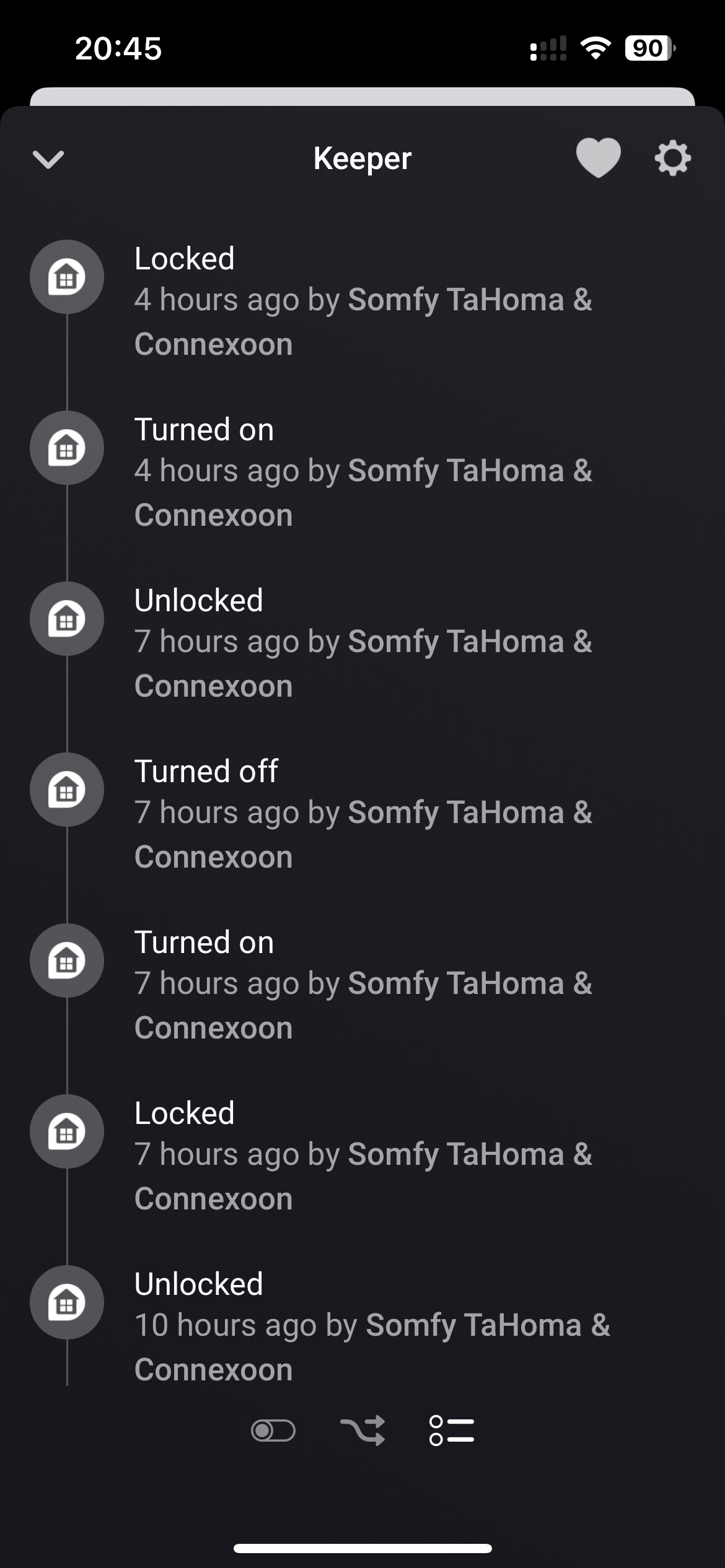
I’d like to have a flow that once I unlock my doors using Doorkeeper, then all blinds in a specific room will go to “My” position.
But it looks like Homey does not recognise Doorkeeper as unlocked when I unlock doors via keypad or nfc tag reader.
Attaching screens below for comparison between Homey timeline info and Somfy Keys info.
Any solution for that?
Thanks in advance.


---
### Author:  [@Adrian\_Rockall](https://community.homey.app/u/Adrian_Rockall)
#### Post date: [October 3, 2023, 8:10am UTC](https://community.homey.app/t/app-cloud-pro-somfy-tahoma-connexoon-v4-0-124-test-v4-0-152/35206/1785 "2023-10-03T08:10:13Z")
Is doorkeeper a Tahoma device?
If it is then could you enable the Information Log in the app settings page, then unlock the door and then send the log.
---
### Author:  [@Blooddrunk](https://community.homey.app/u/Blooddrunk)
#### Post date: [October 3, 2023, 12:31pm UTC](https://community.homey.app/t/app-cloud-pro-somfy-tahoma-connexoon-v4-0-124-test-v4-0-152/35206/1786 "2023-10-03T12:31:43Z")
DoorKeeper has been added through Somfy app in Homey and it is also as a stand alone device in TaHoma app.
Log has been sent to you.
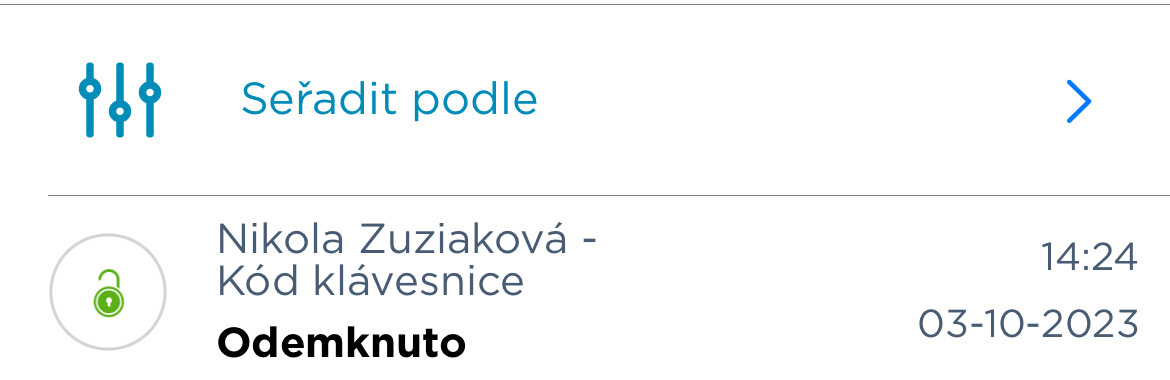
I am also attaching an exact time when doorkeeper has been unlocked through keypad code, nevertheless homey do not recognise it and do not react.

---
### Author:  [@iBosvelt](https://community.homey.app/u/iBosvelt)
#### Post date: [October 3, 2023, 3:28pm UTC](https://community.homey.app/t/app-cloud-pro-somfy-tahoma-connexoon-v4-0-124-test-v4-0-152/35206/1787 "2023-10-03T15:28:56Z")
Are there more people with this error:

I can control the screen with the TaHoma-app.
---
### Author:  [@josserke84](https://community.homey.app/u/josserke84)
#### Post date: [October 3, 2023, 3:58pm UTC](https://community.homey.app/t/app-cloud-pro-somfy-tahoma-connexoon-v4-0-124-test-v4-0-152/35206/1788 "2023-10-03T15:58:40Z")
I also encountered this and solved it by logging in again in the app (app settings and press “save login data”
---
### Author:  [@Wouter\_Artz](https://community.homey.app/u/Wouter_Artz)
#### Post date: [October 3, 2023, 8:10pm UTC](https://community.homey.app/t/app-cloud-pro-somfy-tahoma-connexoon-v4-0-124-test-v4-0-152/35206/1789 "2023-10-03T20:10:16Z")
I am facing a similar issue. Every couple hours the local connection sync seems to fail and I can’t control the blinds through homey anymore. The cloud sync shows I’m not logged in although I entered and saved my credentials on the settings page. Dev mode is turned on within my Somfy account.
---
### Author:  [@Encrypt1957](https://community.homey.app/u/Encrypt1957)
#### Post date: [October 3, 2023, 8:28pm UTC](https://community.homey.app/t/app-cloud-pro-somfy-tahoma-connexoon-v4-0-124-test-v4-0-152/35206/1790 "2023-10-03T20:28:57Z")
Thanks for responding!
I am using the latest version, on a Homey Pro 23.
---
### Author:  [@iBosvelt](https://community.homey.app/u/iBosvelt)
#### Post date: [October 3, 2023, 8:58pm UTC](https://community.homey.app/t/app-cloud-pro-somfy-tahoma-connexoon-v4-0-124-test-v4-0-152/35206/1791 "2023-10-03T20:58:17Z")
Maby can @Adrian_Rockall shine a light on this issue? 🙂
---
### Author:  [@Adrian\_Rockall](https://community.homey.app/u/Adrian_Rockall)
#### Post date: [October 4, 2023, 10:02am UTC](https://community.homey.app/t/app-cloud-pro-somfy-tahoma-connexoon-v4-0-124-test-v4-0-152/35206/1792 "2023-10-04T10:02:53Z")
For users that loose local connection, do you know if the IP address of Tahoma is changing?
I added a fix for that just before my holiday, but maybe it’s still not working.
As a test, could you assign a fixed IP via your network dhcp server to see if that solves the problem.
---
### Author:  [@josserke84](https://community.homey.app/u/josserke84)
#### Post date: [October 4, 2023, 2:26pm UTC](https://community.homey.app/t/app-cloud-pro-somfy-tahoma-connexoon-v4-0-124-test-v4-0-152/35206/1793 "2023-10-04T14:26:22Z")
Nice suggestion. I’ll check that.
Don’t forget to also enjoy your holiday!
---
### Author:  [@Blooddrunk](https://community.homey.app/u/Blooddrunk)
#### Post date: [October 4, 2023, 4:13pm UTC](https://community.homey.app/t/app-cloud-pro-somfy-tahoma-connexoon-v4-0-124-test-v4-0-152/35206/1794 "2023-10-04T16:13:34Z")
Fact is, that Doorkeeper has been added through option Door Lock (iO) which is older type of lock, but it worked so I guess it was made for that. That may be also an issue.
[Previous page](https://community.homey.app/t/app-cloud-pro-somfy-tahoma-connexoon-v4-0-124-test-v4-0-152/35206.md?page=88)
[Next page](https://community.homey.app/t/app-cloud-pro-somfy-tahoma-connexoon-v4-0-124-test-v4-0-152/35206.md?page=90)