# \[APP\]\[Cloud & Pro\] Somfy Tahoma & Connexoon (v4.0.124, test v4.0.152)
**URL:** https://community.homey.app/t/app-cloud-pro-somfy-tahoma-connexoon-v4-0-124-test-v4-0-152/35206
**Category:** Apps
**Tags:** official, homey-pro
**Created:** [September 29, 2020, 3:01pm UTC](https://community.homey.app/t/app-cloud-pro-somfy-tahoma-connexoon-v4-0-124-test-v4-0-152/35206 "2020-09-29T15:01:37Z")
**Posts on this page:** 20
**Page:** 87
### Author:  [@Adrian\_Rockall](https://community.homey.app/u/Adrian_Rockall)
#### Post date: [September 13, 2023, 6:01pm UTC](https://community.homey.app/t/app-cloud-pro-somfy-tahoma-connexoon-v4-0-124-test-v4-0-152/35206/1735 "2023-09-13T18:01:54Z")
OK, everything seems to work as expected. The following is a summary from the log showing the log line number and the action / event. The “ActiveZonesState” is a report back from Tahoma stating which zones are active.
```auto
Line Action / Event
430: "alarmOff",
673: "alarmOn", // Switching on activates all zones at once
987: "ActiveZonesState", "A,B,C", // And here we can see all zones have switched on
1029: "ActiveZonesState", "A,B,C"
1068: "alarmZoneOn" - "B,C", // Zones can only be switched on, so this has no affected as all the zones are laready on
1405: "ActiveZonesState", "A,B,C"
1447: "ActiveZonesState", "A,B,C"
1546: "alarmZoneOn", "A,B,C",
1868: "ActiveZonesState", "A,B,C"
1958 "ActiveZonesState", "A,B,C"
2208: "alarmZoneOn", "A",
2310: "ActiveZonesState", "A,B,C"
2352: "ActiveZonesState", "A,B,C"
2433: "alarmZoneOn", "A,B,C",
2535: "ActiveZonesState", "A,B,C"
2577: "ActiveZonesState", "A,B,C"
2802: "alarmOff", // Switch all zones off
2974: "ActiveZonesState", "" // All zones are now off
3016: "ActiveZonesState", ""
3297: "alarmOff",
3432: "alarmOn"
3627: "ActiveZonesState", "A,B,C"
```
So to see if the Zone buttons work, you need to start from all off and then turn on Zone A, leave it for about 30 seconds and then try Zones B and C in quick succession.
I hope that makes sense.
---
### Author:  [@Adrian\_Rockall](https://community.homey.app/u/Adrian_Rockall)
#### Post date: [September 13, 2023, 6:18pm UTC](https://community.homey.app/t/app-cloud-pro-somfy-tahoma-connexoon-v4-0-124-test-v4-0-152/35206/1736 "2023-09-13T18:18:33Z")
I have looked at the log and it appears the app is doing everything it can to stop the previous command. First I see the “close” command being sent on line 456. Then it sends a request to cancel that command (which is not shown in the log but the effects are shown on line 233). Then it sends “stop” command on line 206. The cancel command should be enough to stop the screen moving and the stop command is just an extra step to backup the cancel. So, I’m not sure why the screen is not stopping quicker
I will take a closer look later to check on timings just to make sure the stop command is not sent too soon after the cancel, etc.
---
### Author:  [@Geert\_Jacobs](https://community.homey.app/u/Geert_Jacobs)
#### Post date: [September 13, 2023, 7:41pm UTC](https://community.homey.app/t/app-cloud-pro-somfy-tahoma-connexoon-v4-0-124-test-v4-0-152/35206/1737 "2023-09-13T19:41:19Z")
Hi Adrian,
First the bad news: i pressed All off, the alarm
Confirms this command with a beep and then waited 30 seconds. Then pressed zone A and waited 30 seconds nothing happens. Then
B and C in quick succesion pressed and nothing happens.
Now the good news. It works when button for Zone A and B and C are on
quick succesion pressed and then again C is pressed to enable
Zone C.
I then turned off all to disable zone C
It works when Zone A and B and C in quick succesion are pressed and then again A is pressed to enabled zone A
I then turned off all to disable zone B.
So this sequence commands seem to do the trick.
Infomation log was send! Now keeping my fingers crossed but we look to be very close in cracking the code!
---
### Author:  [@Geert\_Jacobs](https://community.homey.app/u/Geert_Jacobs)
#### Post date: [September 13, 2023, 8:02pm UTC](https://community.homey.app/t/app-cloud-pro-somfy-tahoma-connexoon-v4-0-124-test-v4-0-152/35206/1738 "2023-09-13T20:02:49Z")
A second update.
When i press in very quick succesion button a, b and then c and then b and c again. This armed zone b and c.
Ps button a b c where in white color before starting.
I send you a second log… hope this helps to make the puzzle
---
### Author:  [@Adrian\_Rockall](https://community.homey.app/u/Adrian_Rockall)
#### Post date: [September 13, 2023, 8:53pm UTC](https://community.homey.app/t/app-cloud-pro-somfy-tahoma-connexoon-v4-0-124-test-v4-0-152/35206/1739 "2023-09-13T20:53:07Z")
Unfortunately my Internet is down so not getting the logs through.
Can you confirm if the zone buttons all turn off when you turn the alarm off?
---
### Author:  [@Geert\_Jacobs](https://community.homey.app/u/Geert_Jacobs)
#### Post date: [September 13, 2023, 9:19pm UTC](https://community.homey.app/t/app-cloud-pro-somfy-tahoma-connexoon-v4-0-124-test-v4-0-152/35206/1740 "2023-09-13T21:19:37Z")
Hi Adrian,
I don’t really understand the behaviour of the button colour (white/black).

When i open the device and press nothing i see the screenshot above as a atarting point.
When i press A then B then C and them A i get the screenshot below for a few seconds
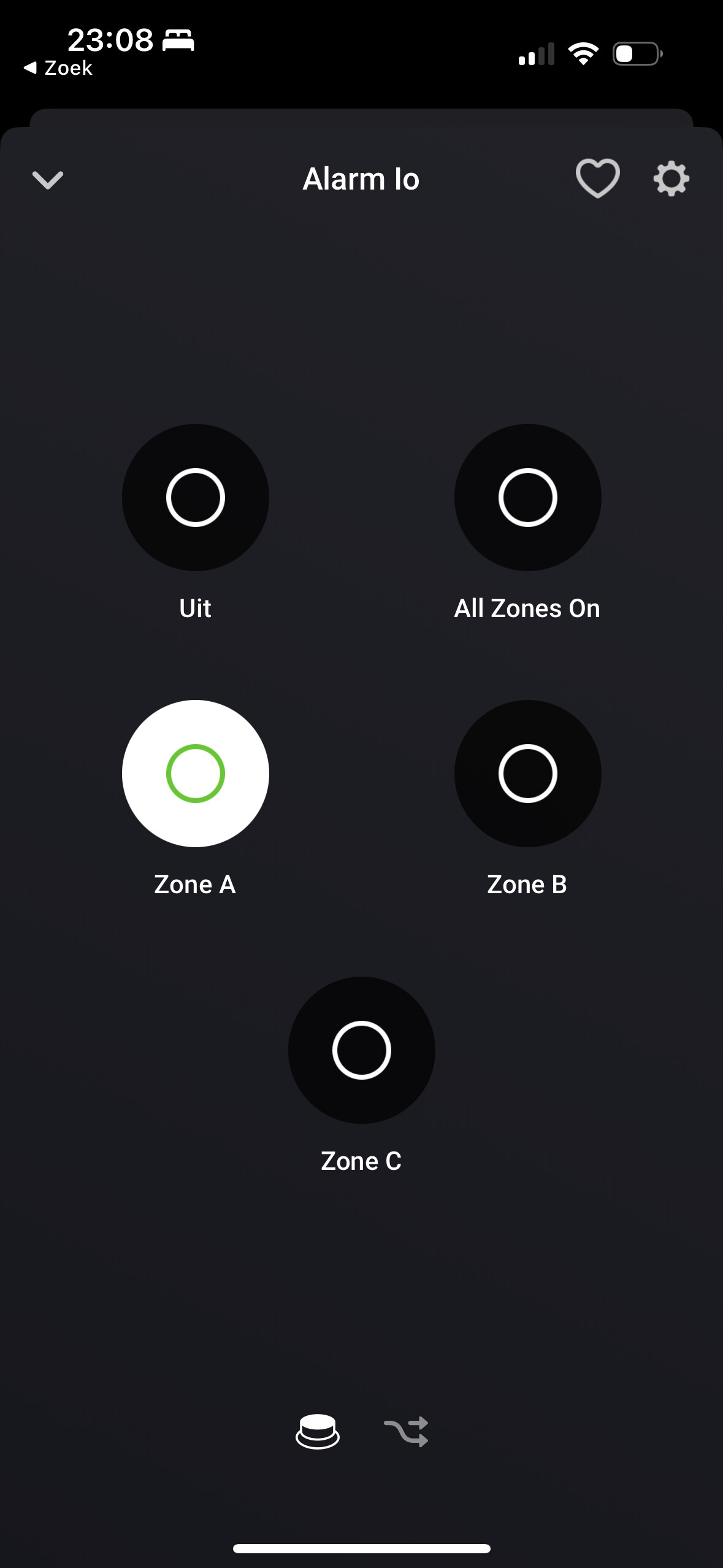
It then after a few seconds jumps back to the screen below (same as first screen) and in this case zone A activated on the alarm.

I now by accident just discovered if i press A and then A again it activates zone A. Same for b and c. So pressing the zone button twice seems to do the trick!
I see no change om the buttons when the alarm is turned off. A, B and C remains white.
---
### Author:  [@Adrian\_Rockall](https://community.homey.app/u/Adrian_Rockall)
#### Post date: [September 13, 2023, 9:54pm UTC](https://community.homey.app/t/app-cloud-pro-somfy-tahoma-connexoon-v4-0-124-test-v4-0-152/35206/1741 "2023-09-13T21:54:33Z")
OK, I think I have found the issue so a new test version is up.
A white Zone button shows that the zone is set and a black zone button shows the zone is not set.
In theory, you should only be allowed to switch a zone on and the only way to switch them of is with the Off button. However, due to some quirks in the UI I can’t 100% block a button from switching off if you tap on it in quick succession. But tricking the UI like that doesn’t actually switch a zone off and at some point a status update will come in that puts the buttons back to the correct state.
---
### Author:  [@Geert\_Jacobs](https://community.homey.app/u/Geert_Jacobs)
#### Post date: [September 14, 2023, 5:08am UTC](https://community.homey.app/t/app-cloud-pro-somfy-tahoma-connexoon-v4-0-124-test-v4-0-152/35206/1742 "2023-09-14T05:08:48Z")
Hi,
Pressing A works. However B and C generate the error as in screenshot.

Information log send.
---
### Author:  [@Adrian\_Rockall](https://community.homey.app/u/Adrian_Rockall)
#### Post date: [September 14, 2023, 7:24am UTC](https://community.homey.app/t/app-cloud-pro-somfy-tahoma-connexoon-v4-0-124-test-v4-0-152/35206/1743 "2023-09-14T07:24:51Z")
If you press the Off button, do all the Zone buttons turn off?
---
### Author:  [@Geert\_Jacobs](https://community.homey.app/u/Geert_Jacobs)
#### Post date: [September 14, 2023, 8:11am UTC](https://community.homey.app/t/app-cloud-pro-somfy-tahoma-connexoon-v4-0-124-test-v4-0-152/35206/1744 "2023-09-14T08:11:05Z")
Hi
I just send you a new log.
When i press zone A - zone a is enabled
When i press uit (off) - all zones are disabled
When i press all zones on - all zones are enabled
When i press uit (off) - all zones are disabled
When i press b or c nothing happens and i get the error as in previous screenshot.
Regards
---
### Author:  [@Geert\_Jacobs](https://community.homey.app/u/Geert_Jacobs)
#### Post date: [September 17, 2023, 5:16pm UTC](https://community.homey.app/t/app-cloud-pro-somfy-tahoma-connexoon-v4-0-124-test-v4-0-152/35206/1745 "2023-09-17T17:16:29Z")
Hi Adrian,
If you still need something from me let me know.
Regards
---
### Author:  [@Adrian\_Rockall](https://community.homey.app/u/Adrian_Rockall)
#### Post date: [September 17, 2023, 5:35pm UTC](https://community.homey.app/t/app-cloud-pro-somfy-tahoma-connexoon-v4-0-124-test-v4-0-152/35206/1746 "2023-09-17T17:35:50Z")
Have you sent me a log with that sequence?
The only logs I have received lately only have a few entries in just showing the app startup.
---
### Author:  [@Geert\_Jacobs](https://community.homey.app/u/Geert_Jacobs)
#### Post date: [September 17, 2023, 5:53pm UTC](https://community.homey.app/t/app-cloud-pro-somfy-tahoma-connexoon-v4-0-124-test-v4-0-152/35206/1747 "2023-09-17T17:53:17Z")
Hi
I just send you a brand new log.
When i press zone A - zone a is enabled
When i press uit (off) - all zones are disabled
When i press all zones on - all zones are enabled
When i press uit (off) - all zones are disabled
When i press b or c nothing happens and i get the error as mentioned in earlier posts.
Regards
---
### Author:  [@Adrian\_Rockall](https://community.homey.app/u/Adrian_Rockall)
#### Post date: [September 17, 2023, 6:04pm UTC](https://community.homey.app/t/app-cloud-pro-somfy-tahoma-connexoon-v4-0-124-test-v4-0-152/35206/1748 "2023-09-17T18:04:24Z")
Thanks, I have it. I will check it when my daughter let’s me get on th PC
---
### Author:  [@thobu](https://community.homey.app/u/thobu)
#### Post date: [September 18, 2023, 12:39pm UTC](https://community.homey.app/t/app-cloud-pro-somfy-tahoma-connexoon-v4-0-124-test-v4-0-152/35206/1749 "2023-09-18T12:39:57Z")
Hey, I’m using a roller shutter Sonesse 40 io. Now, I was wondering if this screen is just for information purposes and if there’s an actual MyPosition button somewhere…

Thanks for helping out.
---
### Author:  [@Adrian\_Rockall](https://community.homey.app/u/Adrian_Rockall)
#### Post date: [September 18, 2023, 12:52pm UTC](https://community.homey.app/t/app-cloud-pro-somfy-tahoma-connexoon-v4-0-124-test-v4-0-152/35206/1750 "2023-09-18T12:52:23Z")
There probably should be. Could you send me the Device Log from the app settings page?
---
### Author:  [@thobu](https://community.homey.app/u/thobu)
#### Post date: [September 18, 2023, 1:45pm UTC](https://community.homey.app/t/app-cloud-pro-somfy-tahoma-connexoon-v4-0-124-test-v4-0-152/35206/1751 "2023-09-18T13:45:28Z")
done
---
### Author:  [@Adrian\_Rockall](https://community.homey.app/u/Adrian_Rockall)
#### Post date: [September 18, 2023, 6:47pm UTC](https://community.homey.app/t/app-cloud-pro-somfy-tahoma-connexoon-v4-0-124-test-v4-0-152/35206/1752 "2023-09-18T18:47:01Z")
Could you try the new test version.
---
### Author:  [@thobu](https://community.homey.app/u/thobu)
#### Post date: [September 18, 2023, 7:38pm UTC](https://community.homey.app/t/app-cloud-pro-somfy-tahoma-connexoon-v4-0-124-test-v4-0-152/35206/1753 "2023-09-18T19:38:37Z")
Got it
---
### Author:  [@thobu](https://community.homey.app/u/thobu)
#### Post date: [September 19, 2023, 7:30am UTC](https://community.homey.app/t/app-cloud-pro-somfy-tahoma-connexoon-v4-0-124-test-v4-0-152/35206/1754 "2023-09-19T07:30:23Z")
It seems the Position states that 1 = open (100% Up), 0 = closed (100% down). The My position however takes is percentage from 100% = 100 % down. I tried to use “Invert Position” on a single device but this didn’t change anything … can this be adapted without doing any calculations.
[Previous page](https://community.homey.app/t/app-cloud-pro-somfy-tahoma-connexoon-v4-0-124-test-v4-0-152/35206.md?page=86)
[Next page](https://community.homey.app/t/app-cloud-pro-somfy-tahoma-connexoon-v4-0-124-test-v4-0-152/35206.md?page=88)