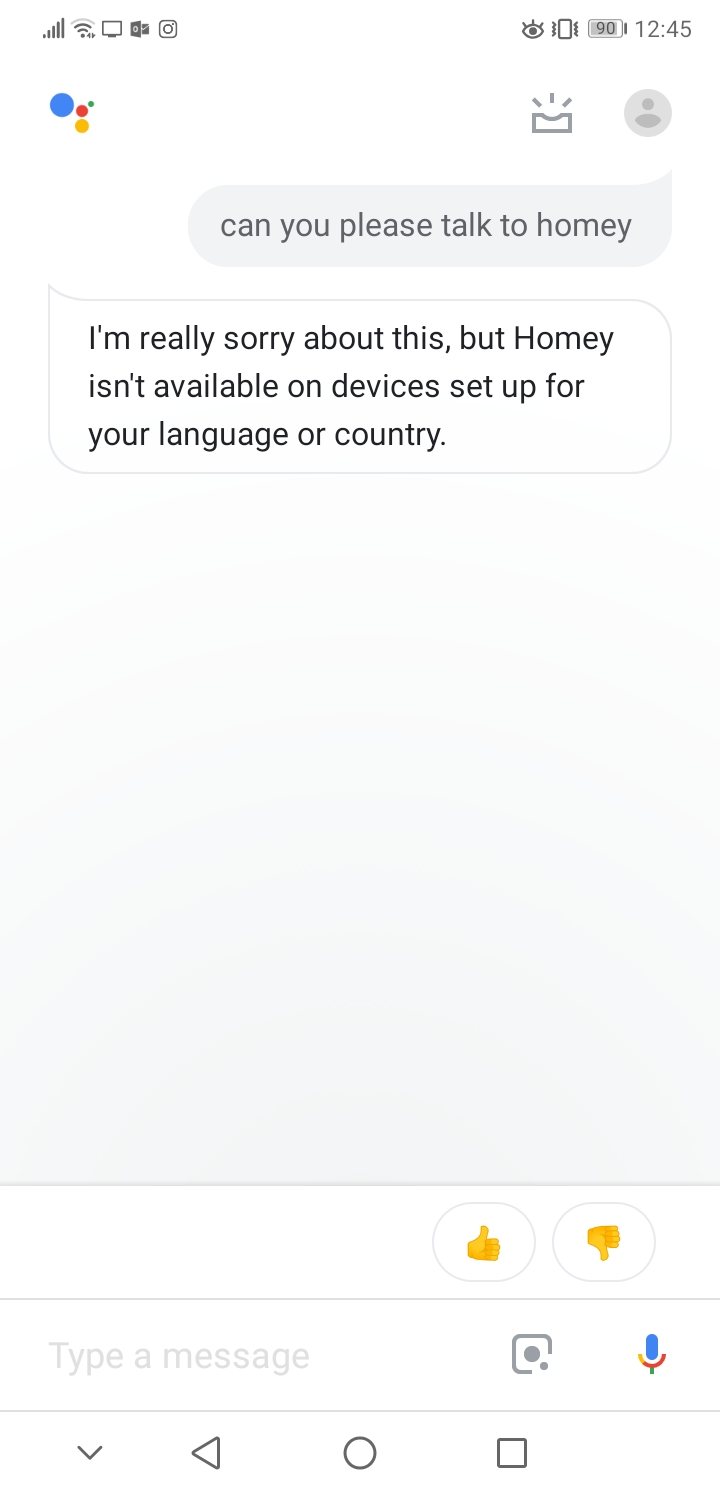
# Anyone had problems in connecting the google assistant? see screenshot below
**URL:** https://community.homey.app/t/anyone-had-problems-in-connecting-the-google-assistant-see-screenshot-below/6477
**Category:** Devices
**Created:** [January 8, 2019, 12:00pm UTC](https://community.homey.app/t/anyone-had-problems-in-connecting-the-google-assistant-see-screenshot-below/6477 "2019-01-08T12:00:53Z")
**Posts on this page:** 9
**Page:** 1
### Author:  [@Simone\_Dormio](https://community.homey.app/u/Simone_Dormio)
#### Post date: [January 8, 2019, 12:00pm UTC](https://community.homey.app/t/anyone-had-problems-in-connecting-the-google-assistant-see-screenshot-below/6477/1 "2019-01-08T12:00:53Z")
---
### Author:  [@PetervdK](https://community.homey.app/u/PetervdK)
#### Post date: [January 8, 2019, 2:09pm UTC](https://community.homey.app/t/anyone-had-problems-in-connecting-the-google-assistant-see-screenshot-below/6477/2 "2019-01-08T14:09:42Z")
Just change the language to one that is supported by Homey…
---
### Author:  [@Simone\_Dormio](https://community.homey.app/u/Simone_Dormio)
#### Post date: [January 8, 2019, 3:47pm UTC](https://community.homey.app/t/anyone-had-problems-in-connecting-the-google-assistant-see-screenshot-below/6477/3 "2019-01-08T15:47:37Z")
So i cannot use this in english?
---
### Author:  [@PetervdK](https://community.homey.app/u/PetervdK)
#### Post date: [January 8, 2019, 4:34pm UTC](https://community.homey.app/t/anyone-had-problems-in-connecting-the-google-assistant-see-screenshot-below/6477/5 "2019-01-08T16:34:33Z")
And that must be a language that both Homey and Home support.
---
### Author:  [@Westerlind.r](https://community.homey.app/u/Westerlind.r)
#### Post date: [March 18, 2019, 9:01pm UTC](https://community.homey.app/t/anyone-had-problems-in-connecting-the-google-assistant-see-screenshot-below/6477/6 "2019-03-18T21:01:55Z")
Both homey and tablet with main account (owner) and all set to english US its working most of the time.
But if i connect Google Ass on the secondary tablet with a user account (non owner) its not working. The homey is linked but Google Ass returns “cant send messages yet”. So iam guessing its understands the input but dont have “permission” to access homey due to the account type?
Sometimes if you say Get Homey, homey connects. Then if you say something (like to turn some lights on) google responds as described above again.
Any idea sombody?
---
### Author:  [@MarcelS](https://community.homey.app/u/MarcelS)
#### Post date: [June 1, 2019, 8:31am UTC](https://community.homey.app/t/anyone-had-problems-in-connecting-the-google-assistant-see-screenshot-below/6477/7 "2019-06-01T08:31:40Z")
I run into the same issue. The primary account can connect, the secondary cant’t. I have set up both to allow access to Homey. So two Homey accounts, two google accounts. The main account works fine the secondary does not.
---
### Author:  [@Timmeh](https://community.homey.app/u/Timmeh)
#### Post date: [December 22, 2019, 7:32pm UTC](https://community.homey.app/t/anyone-had-problems-in-connecting-the-google-assistant-see-screenshot-below/6477/8 "2019-12-22T19:32:19Z")
Hi everyone. I tried a few times to connect google assistant mini with homey via Google home app like explained with the homey video, and written instructions on the web. Not difficult at all I thought… I find homey via Google home app, I am able to log in with my athom account, able to allow access, it redirects back to Google home app, it states logging in, then linking account but than it stops… homey is not being added.
I already tried it a few times, with full battery of my phone, reinstalled my Google home app, reinstalled homey…
Seriously do not know what to do. By the looks of it it is a Google issue but couldn’t find it here on the forum. Hope someone can advise.
Thanks
Tim
---
### Author:  [@Timmeh](https://community.homey.app/u/Timmeh)
#### Post date: [December 22, 2019, 8:34pm UTC](https://community.homey.app/t/anyone-had-problems-in-connecting-the-google-assistant-see-screenshot-below/6477/10 "2019-12-22T20:34:33Z")
Hi Roy.
Thanks. But yes I tried. First I Could not press the sync button and received an error, now I did not received an error and was able to press on sync.
Tried the same steps as described but still same issue, homey is not added to my home app…
---
### Author:  [@Timmeh](https://community.homey.app/u/Timmeh)
#### Post date: [December 24, 2019, 11:05am UTC](https://community.homey.app/t/anyone-had-problems-in-connecting-the-google-assistant-see-screenshot-below/6477/11 "2019-12-24T11:05:59Z")
For the record. First add other items in homey and then connect google. That works 🤣🤣🤣